Show code cell content
import mmf_setup; mmf_setup.nbinit()
import os
from pathlib import Path
FIG_DIR = Path(mmf_setup.ROOT) / '../Docs/_build/figures/'
os.makedirs(FIG_DIR, exist_ok=True)
import logging; logging.getLogger("matplotlib").setLevel(logging.CRITICAL)
%matplotlib inline
import numpy as np, matplotlib.pyplot as plt
try: from myst_nb import glue
except: glue = None
#import mpld3
#mpld3.enable_notebook()  # Makes all fogires d3, but this is slow
import manim.utils.ipython_magic
!manim --version
This cell adds /home/docs/checkouts/readthedocs.org/user_builds/iscimath-583-fractals/checkouts/latest/src to your path, and contains some definitions for equations and some CSS for styling the notebook. If things look a bit strange, please try the following:
- Choose "Trust Notebook" from the "File" menu.
- Re-execute this cell.
- Reload the notebook.
---------------------------------------------------------------------------
ModuleNotFoundError                       Traceback (most recent call last)
Cell In[1], line 13
     10 except: glue = None
     11 #import mpld3
     12 #mpld3.enable_notebook()  # Makes all fogires d3, but this is slow
---> 13 import manim.utils.ipython_magic
     14 get_ipython().system('manim --version')

ModuleNotFoundError: No module named 'manim'
Fractals#
Twindragon#
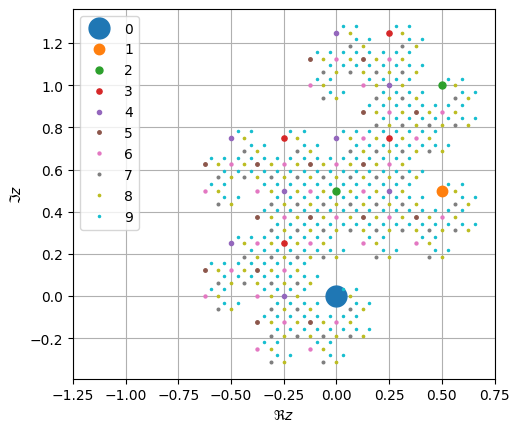
Here is the construction of the twindragon suggested by expressing all proper binary fractions 0.100101, 0.001101, etc. in base \((1-\I)\). I.e. if \(d_n\) is the \(n\)th digit:
Noting that \(1-\I = \sqrt{2}e^{-\pi \I/4}\), we have
base = (1-1j)

q = 1/base
points = np.array([0])
N = 10

fig, ax = plt.subplots()
ms0 = 30
collection = list(ax.plot(points.real, points.imag, '.', ms=ms0, label="0"))
labels = ["0"]

for n in range(1, N):
    new_points = points + q
    collection.append(
        ax.plot(new_points.real, new_points.imag, '.', ms=ms0/(1+n), label=str(n)))
    labels.extend(str(n))
    points = np.concatenate([points, new_points])
    q /= base
ax.set(xlim=(-1.25,0.75), aspect=1, xlabel=r"$\Re z$", ylabel=r"$\Im z$")
ax.grid(True)
plt.legend();

#from mpld3 import plugins
#interactive_legend = plugins.InteractiveLegendPlugin(collection, labels)
#plugins.connect(fig, interactive_legend)
#mpld3.display()
base = (1-1j)

q = 1/base
points = np.array([0])
strings = np.array(['0.'])

N = 11

for n in range(1, N):
    new_points = points + q
    points = np.concatenate([points, new_points])
    strings = np.concatenate([np.char.add(strings, '0'), np.char.add(strings, '1')])
    q /= base

fig, ax = plt.subplots()
collection, = ax.plot(points.real, points.imag, '.')
ax.set(xlim=(-1.25,0.75), aspect=1, xlabel=r"$\Re z$", ylabel=r"$\Im z$")
ax.grid(True)

import mpld3
mpld3.plugins.connect(fig, mpld3.plugins.PointLabelTooltip(collection,
                      labels=strings.tolist(), location="bottom right"))
mpld3.display()
---------------------------------------------------------------------------
ModuleNotFoundError                       Traceback (most recent call last)
Cell In[3], line 20
     17 ax.set(xlim=(-1.25,0.75), aspect=1, xlabel=r"$\Re z$", ylabel=r"$\Im z$")
     18 ax.grid(True)
---> 20 import mpld3
     21 mpld3.plugins.connect(fig, mpld3.plugins.PointLabelTooltip(collection,
     22                       labels=strings.tolist(), location="bottom right"))
     23 mpld3.display()

ModuleNotFoundError: No module named 'mpld3'

What numbers lie on the boundaries?
The boundary points can be generated from the strings of digits accepted by a 6-state automaton.
Show code cell content
import functools

base = (1-1j)

q = 1/base
points = np.array([0])

N = 20

for n in range(1, N):
    points = np.concatenate([points, points + q])
    q /= base

fig, ax = plt.subplots()
ax.plot(points.real, points.imag, '.C1')
ax.set(xlim=(-1.25,0.75), aspect=1, xlabel=r"$\Re z$", ylabel=r"$\Im z$")
ax.grid(True)

N = 19
q = 1/base

s = [[''], [''], [''], [''], [''], ['']]

def add(s, c):
    return list(set(np.char.add(s, c)))

def s2z(s):
    d = list(map(int, s))
    n = 1+np.arange(len(d))
    return (d*q**n).sum()

for n in range(N):
    s= [
        list(set(add(s[2-1], '0') + add(s[2-1], '1'))),
        list(set(add(s[2-1], '0') + add(s[4-1], '1'))),
        add(s[1-1], '0'),
        add(s[6-1], '1'),
        list(set(add(s[3-1], '0') + add(s[5-1], '1'))),
        list(set(add(s[5-1], '0') + add(s[5-1], '1')))
    ]

#s = functools.reduce(set.union, s, set())  # Some of these are approximate.
s = set(s[2-1])  # These are exact
boundary = np.array(list(map(s2z, s)))
ax.plot(boundary.real, boundary.imag, '.C0', ms=0.5);

Sir Pinski’s Game and Deterministic Chaos#
Chapter 1: [Schroeder, 1991].
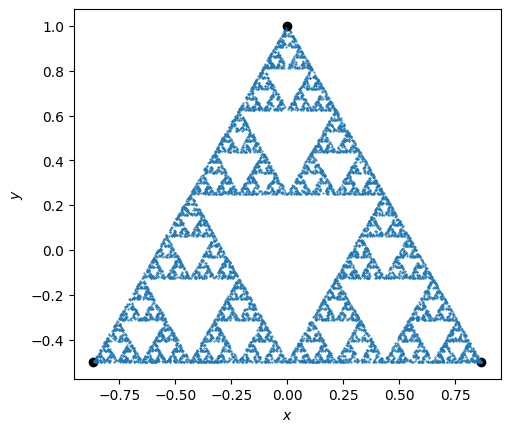
Here we play Sir Pinski’s game.
Note
To simplify the implementation, we use complex numbers \(z=x+\I y\) to represent the points. This makes it easy, for example, to define the vertices \(p_n\) of an equilateral triangle:
To plot these, we need a function z2xy() that extracts and packages the real and
imaginary parts into an appropriate array so that they can be plotted. We use a
property of NumPy arrays that allows a complex array to be viewed as a real array with
twice as many elements. We then reshape things so that the first index selects \(x\) and
\(y\).
We now iterate as follows:
where \(p_{n}\) is one of the vertices, randomly chosen.
Show code cell source
# We will work with complex numbers z = x+1j*y.
ths = np.pi/2 + 2*np.pi * np.arange(3)/ 3
ps = np.exp(1j*ths)   # Points on the triangle.
fig, ax = plt.subplots()

def z2xy(z):
    """Return (x, y) array for complex points z."""
    return np.einsum('...j->j...',
        np.asarray(z, dtype=complex).view(dtype=float).reshape(z.shape + (2,)))

# Use a properly seeded random number generator so we can reproduce our results.
rng = np.random.default_rng(seed=2)

def sirpinski(N, z0=ps[0], Nskip=0, rng=rng, fast=False):
    """Generate N points randomly moving towards the Sirpinski attractor.

    Arguments
    ---------
    N : int
        Points to generate
    z0 : complex
        Initial point
    Nskip : int
        Number of points to skip.
    """
    if fast:
        n = j = np.arange(N+Nskip)
        pj = ps[rng.integers(3, size=N+Nskip)]
        return (z0 + np.cumsum(pj*2**j))/2**n
    else:
        z = z0
        zs = []
        for n in range(Nskip+N):
            z = (z + ps[rng.integers(3)])/2
            if n > Nskip:
                zs.append(z)
        return np.asarray(zs)

ax.plot(*z2xy(ps), 'ok')
ax.plot(*z2xy(sirpinski(10000)), '.', ms=1)
ax.set(xlabel='$x$', ylabel='$y$', aspect=1);